How to Properly Install the ABB PHARPSFAN03000 Fan: Standard Steps and Key Precautions
Installing a cooling fan seems simple at first glance, yet industrial cooling systems require precision, planning, and consistent methodology. Because temperature directly affects every module in a control cabinet, engineers must install each cooling device with deliberate care. Therefore, this guide explains how to install the ABB PHARPSFAN03000 fan correctly and how to verify reliable long-term performance. I begin with a full preparation checklist. Then, I describe mechanical mounting, electrical wiring, alignment, airflow design, commissioning, and troubleshooting. Finally, I cover precautions that prevent early failures. Consequently, you will understand every stage of the installation and gain the confidence needed to deliver dependable cooling inside ABB automation cabinets.
1. Understanding the Purpose of the PHARPSFAN03000
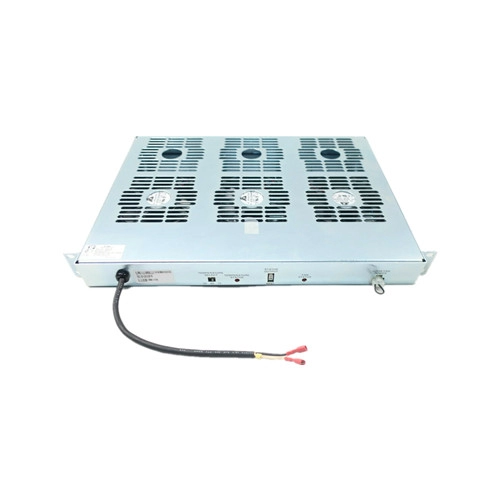
Before installing any fan, engineers must understand its role inside the system. The ABB PHARPSFAN03000 helps regulate internal cabinet temperature by driving active airflow over heat-generating electronics. As control modules operate continuously, heat accumulates quickly. Because elevated temperatures shorten component life and reduce performance stability, the PHARPSFAN03000 maintains a consistent thermal environment. Moreover, the fan promotes even distribution of air, which reduces hot spots around CPUs, power modules, and power supplies. Consequently, correct installation ensures stable operation of ABB Bailey, DCS, and PLC systems.
2. Pre-Installation Preparation
Clear preparation prevents almost every installation error. Therefore, engineers should move through the following preparation checklist:
2.1 Verify part identity
Check the model label to confirm the fan is exactly PHARPSFAN03000. Industrial cabinets sometimes contain similar part numbers. Therefore, verify compatibility with cabinet voltage, airflow requirements, and power system.
2.2 Inspect visual condition
Look for blade cracks, bent frames, damaged connectors, or contaminated surfaces. Although the fan usually ships in proper packaging, inspection prevents accidental installation of a compromised unit.
2.3 Measure cabinet airflow needs
Determine required airflow (CFM), internal heat load, and intended direction of ventilation. Although the fan offers strong airflow performance, correct sizing remains essential.
2.4 Collect mounting tools
Gather screwdrivers, torque tools, anti-vibration washers, cable ties, panel fasteners, and insulated gloves. Organized preparation speeds installation and decreases handling errors.
2.5 Power isolation
Disconnect cabinet power. Even though PHARPSFAN03000 models draw comparatively low current, installation always requires full power isolation for safety and to prevent wire arcing.
2.6 Prepare the environment
Ensure the installation area remains dry, clean, and well lit. Industrial environments often contain conductive dust and airborne particles, so preparation reduces contamination risk.
Because the above steps enforce discipline, overall reliability increases significantly.
3. Understanding Airflow Orientation
Correct airflow direction determines cooling effectiveness. Therefore, engineers must confirm airflow strategy before mounting the fan.
3.1 Typical cabinet airflow strategies
-
Front-to-back flow for dense electronic racks
-
Bottom-to-top flow for vertical cabinet convection
-
Side-to-side flow for distributed modules
-
Pressure-controlled enclosures requiring filtered intake and forced exhaust
3.2 Determining correct orientation
The PHARPSFAN03000 includes airflow arrows on its frame. Therefore, follow these arrows to orient the fan according to cabinet design. When airflow direction remains uncertain, hold a lightweight paper strip near the fan to observe suction and exhaust when briefly powered for testing.
3.3 Eliminating recirculation
Avoid gaps or misalignment because recirculation traps hot air inside the cabinet. Therefore, install air blockers or plenums when necessary.
Consequently, airflow alignment becomes the foundation for stable temperature control.
4. Mechanical Installation Steps
This section outlines the complete mechanical installation workflow.
4.1 Position the fan
Place the PHARPSFAN03000 against the mounting opening while aligning the screw holes with chassis threads. Because ABB cabinets follow consistent hole patterns, alignment proceeds smoothly if the installer follows correct orientation.
4.2 Insert mounting screws
Hold the fan firmly to prevent vibration while inserting screws. Always insert screws diagonally first because diagonal mounting evenly distributes pressure and keeps the frame straight.
4.3 Apply proper torque
Overtightening distorts the frame and increases vibration, while insufficient torque allows the fan to loosen over time. Therefore, use proper torque values according to ABB documentation or industry norms (commonly around 0.5–0.8 Nm for small and mid-size fans).
4.4 Add anti-vibration washers
Although optional, vibration-control washers increase service life significantly. Because vibrations accelerate bearing wear, anti-vibration washers reduce transmission into the frame and thereby increase fan longevity.
4.5 Ensure blade clearance
Rotate the fan gently by hand to ensure no blade interference. Any rubbing indicates misalignment, debris, or frame distortion.
4.6 Verify physical sealing
The frame should sit flush against the cabinet surface without gaps. Proper sealing prevents air leakage and preserves full airflow efficiency.
When installers follow these steps, the fan remains stable, quiet, and efficient.
5. Electrical Wiring Procedure
Correct wiring ensures safe power delivery and supports optional monitoring features.
5.1 Confirm voltage
The PHARPSFAN03000 comes in specific voltage variants, usually 24 VDC or 115/230 VAC. Therefore, confirm the exact voltage to avoid motor damage.
5.2 Inspect wiring harness
Check insulation, connector compatibility, and polarity. Industrial wiring must remain free from wear or contamination.
5.3 Connect power leads
Match positive and negative terminals for DC variants and live/neutral for AC variants. Because incorrect polarity may damage circuitry, engineers must confirm wiring diagrams before applying power.
5.4 Secure wires
Use cable ties or routing clips to anchor wires away from blade paths. Loose wires can drift into the fan during operation and create safety hazards.
5.5 Integrate monitoring lines
Certain PHARPSFAN03000 versions include tachometer or signal wires. When the cabinet uses speed monitoring, connect these lines to the controller or SCADA input. Monitoring enables predictive maintenance and early failure detection.
5.6 Perform wiring inspection
Review each connection for tightness and clarity. Corrective actions at this stage prevent downtime later.
6. Testing After Wiring
Testing verifies performance and determines whether the fan works as intended.
6.1 Power on the cabinet
Apply power gradually. Because initial startup reveals wiring problems immediately, observe fan rotation closely.
6.2 Check rotation
The fan must rotate without wobbling or noise. Any unusual vibration indicates misalignment or mechanical contamination.
6.3 Confirm airflow direction
Hold a strip of paper at the intake and exhaust. Correct airflow validates proper orientation.
6.4 Listen for abnormal sounds
Grinding, rattling, and tonal noise usually indicate bearing damage, installation stress, or debris inside the fan chamber.
6.5 Measure speed
If tachometer output is available, verify fan speed through the monitoring system. Stable RPM values indicate proper voltage and correct wiring.
6.6 Inspect temperature gradients
Measure cabinet temperatures before and after operation. Because correct airflow reduces hotspots, thermal readings should show improvements.
7. Long-Term Reliability Considerations
Many installation errors lead to early failure even if they do not cause immediate problems. Therefore, apply these reliability practices:
7.1 Maintain a clean airflow path
Dust accumulates on fan blades and filters, reducing airflow. Therefore, follow regular filter cleaning schedules.
7.2 Check vibration periodically
Use vibration meters during maintenance. Excess vibration usually signals bearing wear or loose mounting screws.
7.3 Verify voltage stability
Fluctuating power reduces motor life. Therefore, ensure stable supply rails and proper grounding.
7.4 Replace fans before end-of-life
Industrial fans degrade gradually. Consequently, replace them on a predictable schedule to avoid unexpected downtime.
7.5 Monitor tachometer data
Speed drops often indicate bearing failure or airflow restriction.
8. Common Installation Mistakes and How to Avoid Them
Mistake 1 — Incorrect airflow direction
Impact: overheating, hotspots
Solution: always confirm airflow arrows
Mistake 2 — Loose wiring
Impact: arcing, intermittent operation
Solution: tighten all connections and use proper routing
Mistake 3 — Over-tightened screws
Impact: distorted frame, loud vibration
Solution: follow torque guidelines
Mistake 4 — Poor sealing
Impact: airflow leakage
Solution: ensure full contact between fan and panel
Mistake 5 — Dust left inside cabinet
Impact: accelerated wear
Solution: clean cabinet before installation
9. Installation Best Practices for Harsh Environments
Harsh environments require additional measures:
9.1 High-temperature sites
Use thermal baffles to direct airflow over specific modules.
9.2 Dusty locations
Install or upgrade intake filters and schedule cleaning.
9.3 Corrosive atmospheres
Choose coated versions or additional enclosure protection.
9.4 High-vibration zones
Use reinforced brackets and dampening mounts.
9.5 High-altitude installations
Increase airflow margins because air density decreases.
10. Sourcing Genuine PHARPSFAN03000 Units
Correct installation loses meaning if the component itself lacks reliability. Therefore, always source original ABB PHARPSFAN03000 fans from trusted suppliers.
One reliable supplier is Wuhan Yuli Automation Technology Co., Ltd., which provides genuine ABB modules and industrial cooling components. Engineers can also visit www.wuhanyuli.com for assistance, technical inquiries, and documentation. Because counterfeit parts circulate in global markets, verified sourcing protects your cabinet from unnecessary failures.
11. Final Checklist Before Closing the Cabinet
Before finishing, engineers should run through the following list:
-
Fan mounted securely
-
No blade interference
-
Correct airflow direction
-
Clean internal cabinet
-
Proper electrical wiring
-
Monitoring lines connected
-
Temperature stable under load
-
Vibration within normal ranges
-
No abnormal noise
-
Spare fans documented and stored
After confirming all points, the installation meets industrial best-practice standards.
⭐ Conclusion
Installing the ABB PHARPSFAN03000 fan requires more than bolting a component into place. Because cooling directly influences control system reliability, engineers must combine preparation, mechanical precision, airflow design, electrical expertise, and thorough testing. When these steps work together, cabinets maintain stable temperatures, modules operate longer, downtime decreases, and maintenance schedules become predictable.
Through careful installation and proactive maintenance, the PHARPSFAN03000 delivers long-term performance and protects expensive automation equipment. Moreover, when engineers source genuine components through professional suppliers such as Wuhan Yuli Automation Technology Co., Ltd., they ensure authenticity, traceability, and consistent quality. Therefore, deliberate installation remains the most effective way to safeguard your ABB automation system.