1. Introduction: The Nerve Center of the Dupline Universe
The Dupline (DUal PoLINe) fieldbus system is a cost-effective, two-wire solution designed for connecting digital and analog I/O modules over distances of up to 10 km and more. It is widely used in applications such as building automation, energy management, remote monitoring, and industrial process control. However, a network is only as good as its management tools. Enter the Carlo Gavazzi Dupline GAP1605 Hand Held Terminal.
The GAP1605 is not merely a programmer; it is the primary human-machine interface (HMI) for the entire Dupline system during its setup and lifecycle. It is the device you use to “talk” to the network, to assign addresses, to read input values, to force outputs, and to troubleshoot problems. Its portable, ruggedized design makes it the perfect companion for on-site work, from initial installation to long-term maintenance.
This guide will unpack every facet of the GAP1605, transforming it from a mysterious gadget into a familiar and powerful tool in your hands.
2. Unboxing the GAP1605: Physical Overview and First Impressions
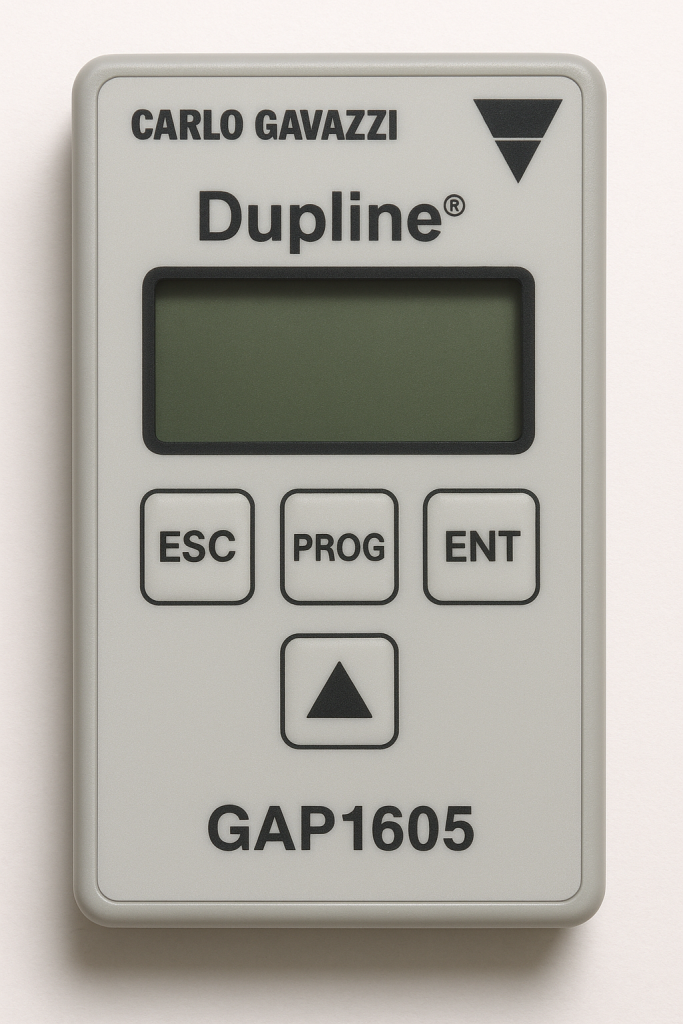
The Carlo Gavazzi Dupline GAP1605 Hand Held Terminal is engineered for the industrial environment. Its design prioritizes durability, intuitive operation, and clear communication.
2.1. Physical Characteristics and Build Quality
- Housing: The device features a robust, impact-resistant plastic casing, often in a distinctive yellow or grey color, designed to withstand the bumps and drops common in field service.
- Display: The centerpiece is a backlit liquid crystal display (LCD). It is typically a 4-line, 20-character alphanumeric display, providing sufficient space to show parameters, values, and menu options clearly.
- Keypad: The tactile membrane keypad is laid out logically. It includes:
- Numerical Keys (0-9): For entering numerical values and addresses.
- Function Keys (F1-F4): Soft keys whose functions change based on the context shown on the display, providing flexible navigation.
- Navigation Keys (Up, Down, Left, Right, Enter, Escape): For scrolling through menus, selecting options, and confirming or canceling actions.
- Special Function Keys: Dedicated keys for common actions like
READ,WRITE,FORCE ON,FORCE OFF, andESC.
- Connection Port: The device connects to the Dupline bus via a dedicated, robust connector, typically a circular or rectangular multi-pin port, ensuring a secure and reliable connection.
2.2. Package Contents
A typical GAP1605 package includes:
- The GAP1605 Hand Held Terminal unit.
- A connection cable (e.g., a 5-meter cable with the specific connector on one end and bare wires or a terminal block on the other for connecting to the Dupline bus).
- User Manual and Quick Start Guide.
- A protective carrying case (in some packages).
3. Deep Dive: Dupline System Hand Held Terminal GAP1605 Technical Parameters
Understanding the technical specifications is crucial for knowing the device’s capabilities and limitations. Here is a detailed breakdown of the GAP1605 technical parameters.
| Parameter | Specification |
|---|---|
| Model | Carlo Gavazzi GAP1605 Hand Held Terminal |
| Supported Systems | Dupline (K, C, S, and i) Series |
| Power Supply | Powered directly from the Dupline fieldbus (Typically 24-30V DC via the bus). No internal battery or external PSU required. |
| Display | 4 x 20 character alphanumeric LCD with backlight. |
| Keypad | Tactile membrane keypad with numeric keys, function keys (F1-F4), and navigation keys. |
| Communication Interface | Dupline two-wire fieldbus. |
| Max. Cable Length | Supports the full Dupline specification (up to 10 km with recommended cable type). |
| Data Transfer Rate | Dupline’s native data rate (typically 1.2 kbit/s). The HHT operates at the bus’s speed. |
| Supported Functions | Addressing of modules, reading input values (digital & analog), forcing outputs, monitoring bus traffic, configuring counter modules, scaling analog values, system diagnostics. |
| Operating Temperature | -10 °C to +50 °C (14 °F to 122 °F) |
| Storage Temperature | -20 °C to +70 °C (-4 °F to 158 °F) |
| Relative Humidity | 20% to 80% RH (non-condensing) |
| Protection Class | Typically IP40 (suitable for indoor/control panel use). |
| Dimensions (LxWxD) | Approximately 200 x 90 x 40 mm (varies slightly). |
| Weight | Approximately 400-500 grams (including cable). |
| Connector | Proprietary multi-pin connector for the dedicated Dupline cable. |
Analysis of Key Technical Parameters:
- Bus-Powered Operation: This is a significant advantage. The GAP1605 draws its operating power directly from the Dupline bus, eliminating the need for batteries that can die at a critical moment or an external power adapter. This makes it truly portable and instantly ready for use.
- Broad System Compatibility: Its support for all major Dupline series (K, C, S, i) ensures it is a future-proof investment. Whether you are working on a legacy system or a new installation, the GAP1605 is compatible.
- Robust Environmental Ratings: The operating temperature and humidity ranges are typical for industrial handheld devices, making it suitable for use in most factory and building environments, though it should be protected from direct exposure to water and dust.
4. Core Functionalities: What Can the GAP1605 Actually Do?
The Carlo Gavazzi Dupline GAP1605 Hand Held Terminal is a multi-talented device. Its functionalities can be categorized into several key areas:
4.1. Module Addressing and Commissioning
This is its primary function. Every module on a Dupline network (e.g., a digital input module UDM 40D11, an analog output module UAM 40A02) must have a unique address for the master station to communicate with it. The GAP1605 is the tool used to set these addresses.
- Process: The technician connects the HHT to the bus, selects the “Address” function, and writes the desired address (e.g., 01, 25, 100) to the specific module.
4.2. Real-Time Monitoring and Data Reading
The HHT acts as a window into the live state of the network.
- Digital Inputs/Outputs: You can read the ON/OFF status of any digital point.
- Analog Inputs/Outputs: You can read the real-time value of any analog point, displayed in its engineering units (e.g., °C, kPa, %). This is invaluable for calibrating sensors and verifying system operation.
4.3. Output Forcing
For testing and troubleshooting actuators like valves, motors, or lights, the GAP1605 allows you to manually force outputs to a specific state.
- Safety Note: Forcing outputs is a powerful function that can disrupt a running process. It should only be performed by qualified personnel with a clear understanding of the system’s interlocking and safety procedures.
4.4. Bus Monitoring and Diagnostics
The HHT can monitor the raw traffic on the Dupline bus. This advanced function allows technicians to see if modules are responding, check for communication errors, and diagnose issues like bus shorts or noise.
4.5. Configuration of Intelligent Modules
For more complex modules like counters (e.g., UCM series) or timers, the GAP1605 is used to set parameters such as preset values, count directions, and reset conditions.
4.6. Scaling of Analog Values
It allows for the scaling of analog inputs and outputs, converting raw digital values into meaningful engineering units.
5. Step-by-Step Operational Guide: A Practical Walkthrough
Let’s simulate a common task: addressing a new digital input module and reading its status.
Prerequisite: Ensure the Dupline bus is powered (24-30V DC) and the module is physically connected.
Step 1: Physical Connection
Connect the GAP1605 cable to the device. Connect the other end (bare wires) to the Dupline bus terminals: typically, the red wire to the positive terminal (D+) and the black wire to the negative terminal (D-). Observe polarity.
Step 2: Power Up
The GAP1605 will power on automatically. The display will light up, showing a welcome screen or the main menu.
Step 3: Addressing a Module
- Navigate the menu using the arrow keys. Find and select the option “ADDRESS MODULE” or similar.
- The HHT will prompt you to enter the module’s current address. For a new module, this is often a default like “00”. Press
ENTER. - The HHT will search for the module. Once found, it will display the module type (e.g., “UDM 40D11”).
- You will then be prompted to enter the new address (e.g., “15”).
- Press
WRITEorENTERto confirm. The HHT will display a success message. The module is now commissioned with address 15.
Step 4: Reading an Input Status
- Go back to the main menu and select “READ INPUT” or “MONITOR“.
- Select the type of point (e.g., “Digital Input”).
- Enter the address you just set, “15”, and the specific channel number (e.g., “01” for the first channel).
- Press
READorENTER. The display will show the status, for example, “CH01: ON” or “CH01: OFF“.
Step 5: Forcing an Output (Use with Caution)
- Navigate to “FORCE OUTPUT“.
- Enter the address and channel of the digital output module.
- Select “FORCE ON” or “FORCE OFF“.
- Confirm the action. The connected actuator (e.g., a light) should activate/deactivate.
- Crucially, remember to select “RELEASE FORCE” afterward to return control to the system’s main controller.
6. Integration in a Complete Dupline System
The GAP1605 does not operate in a vacuum. Its true value is realized within a complete Dupline architecture, which typically includes:
- Dupline Master Station: The brain of the system (e.g., a PLC, a gateway like the CVM series, or a PC interface card).
- Dupline I/O Modules: The distributed field devices (digital/analog inputs and outputs, counter modules, etc.).
- Dupline Bus: The simple, twisted-pair two-wire cable that connects everything.
- Power Supply: A 24-30V DC power source for the bus.
The GAP1605 is the universal key that interfaces with every component on the bus, from the master down to the simplest I/O module.
7. Troubleshooting Common Issues with the GAP1605
Even the best tools can encounter issues. Here are common problems and their solutions:
- GAP1605 does not power on:
- Check: Dupline bus power. Is the voltage between 24-30V DC?
- Check: Cable connection. Are the wires securely connected to D+ and D-?
- Check: Polarity. Is the red wire on D+ and black on D-?
- “Module Not Found” error when addressing:
- Check: The module’s physical connection to the bus.
- Check: If you are using the correct default address.
- Check: For bus shorts or breaks using a multimeter.
- Unreadable or garbled display:
- Check: The contrast setting (if adjustable via a potentiometer or in the menu).
- Check: The backlight. It might be off; try pressing the light key.
8. Advantages and Conclusion: Why the GAP1605 is Indispensable
The Carlo Gavazzi Dupline GAP1605 Hand Held Terminal is more than just an accessory; it is a fundamental component of the Dupline ecosystem. Its advantages are clear:
- Simplicity and Ease of Use: The intuitive menu structure and clear display make it accessible for technicians of all skill levels.
- Robustness and Reliability: Built for the industrial world, it withstands the rigors of field service.
- Bus-Powered Convenience: No batteries to charge or replace, ensuring it’s always operational when connected to a live bus.
- Comprehensive Functionality: It combines the roles of a programmer, a monitor, a diagnostic tool, and a tester in one compact device.
- Cost-Effectiveness: By reducing commissioning and troubleshooting time, it pays for itself quickly in saved labor hours.
Conclusion
In the intricate dance of industrial automation, clear communication is paramount. The Carlo Gavazzi Dupline GAP1605 Hand Held Terminal serves as the universal translator and conductor for the Dupline fieldbus system. By mastering its technical parameters, understanding its wide array of functions, and following proper operational procedures, engineers and technicians can unlock the full potential of their automation networks. It is the key that ensures systems are commissioned correctly, maintained efficiently, and kept running smoothly for years to come. For anyone working with Carlo Gavazzi’s Dupline technology, the GAP1605 is not just a recommended tool—it is an essential one.